Australian Banking, PayID & EFTPOS Outages: 5 Rules Under the ePayments Code & AFCA
Prevent double-debits when PayID or Osko transfers freeze, use chip-and-PIN or dual-network eftpos tricks at checkouts, and recover dishonour fees via the ePayments Code and AFCA.
Picture tapping "Pay" on a Friday afternoon rent transfer via Osko, watching the spinner freeze for 45 seconds, and staring at a vague network error instead of a green confirmation receipt. Within minutes, social feeds light up with CommBank, Westpac, NAB or ANZ login complaints. Because mobile banking apps, physical card terminals, direct entry batches and the New Payments Platform (NPP) operate on separate technical layers, a PayID and banking outage rarely bricks every payment rail at the exact same moment. Following five disciplined habits keeps your money safe from duplicate transfers and ensures any bank-caused dishonour fee gets refunded in full.
How Australian Payment Rails Split Technical Risk
Not all electronic payments travel down the same pipe. Understanding the difference stops panic decisions:
| Payment Channel | Underlying Rail | Impact When Bank App Fails | Best Immediate Fallback |
|---|---|---|---|
| PayID / Osko | New Payments Platform (NPP) | Frequently stalls as “Pending” or queues for delayed settlement | Stop retrying; verify pending items before re-sending |
| Mobile Wallet (Apple / Google Pay) | Issuer Tokenisation + Card Scheme | Can decline if cloud token check drops | Insert physical chip card directly |
| Dual-Network Debit Card | eftpos (CHQ/SAV) + Visa/Mastercard (CR) | Often keeps authenticating if one switch hiccups | Toggle Savings vs Credit button on terminal |
| BECS Direct Debit / Payroll | Batch clearing files | Usually unaffected by retail web app outages | Check available balance once app settles |
Rule 1: Never Tap "Send" Twice on a Stalled PayID or Osko Transfer
The fastest way to empty an everyday transaction account accidentally is retrying an Osko transfer three times while a bank's app API is lagging. In core-banking brownouts, the transfer instruction often reaches the outbound NPP gateway cleanly while only the confirmation screen fails to load back on your phone. Once queued messages drain two hours later, all three duplicate debits can execute seconds apart.
Whenever a fast transfer times out, force-close the app, wait five minutes, inspect pending holds, and verify live Australian banking & PayID outages (tracking ACCC Open Banking Consumer Data Right status feeds across Big 4 and challenger banks) before touching the transfer button again. Remember too that an Osko receipt is only confirmation once a unique NPP transaction reference appears in settled ledger history—not on an hourglass loading wheel. If a rent due date or property settlement approaches during a live app outage, screenshot your account balance showing cleared available funds, ring your bank's priority telephone banking desk, and ask whether BSB/Account overnight batch clearing remains unaffected while mobile PayID gateways clear their backlog.
Rule 2: Carry Physical Plastic & Use Dual-Network Terminal Switching
Going 100% phone-only works brilliantly until a cloud wallet or bank login gateway drops offline at the petrol pump. Carrying one physical debit card unlocks two reliable checkout rescues:
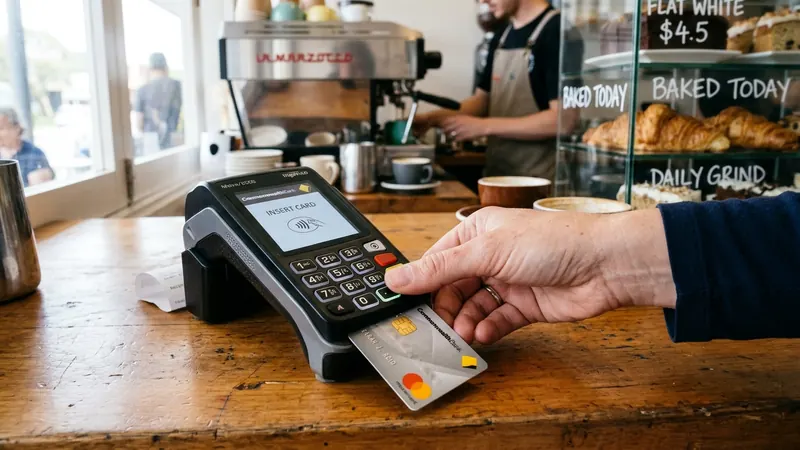
- Insert Chip Instead of Tapping NFC: Contactless tap limits fail faster during issuer-host timeouts, whereas inserting a card triggers EMV chip-and-PIN standby authorisation supported by major acquiring switches like Tyro, Square and bank terminals.
- Swap CHQ/SAV vs Credit on Dual-Network Cards: Most Australian everyday debit cards carry domestic eftpos alongside Visa or Mastercard on the same piece of plastic. Selecting Credit (still spending your own funds, never accruing credit card interest) routes transactions across the international card network instead of the domestic eftpos switch if one switch lags.

Rule 3: Protect Small Business Terminals with Electronic Fallback (EFB)
Cafes, pharmacies and tradespeople lose real revenue during afternoon gateway drops unless merchant terminals are configured safely. Modern bank terminals and platforms like Tyro or Square offer Electronic Fallback (EFB) or offline queuing for low-value chip/tap sales up to agreed floor limits, alongside Wi-Fi / dual-SIM failover if one cellular carrier drops offline. Confirming with your merchant desk ahead of peak weekends whether EFB is turned on—or keeping an emergency secondary mobile reader on another bank—protects weekend takings.
Rule 4: Enforce Fee Reversals Under the ASIC ePayments Code
All major Australian retail banks subscribe to the ASIC ePayments Code and Banking Code of Practice. Consumers are protected from bearing losses or penalty charges caused directly by malfunctions in a bank's electronic payment system unless an unmistakable on-screen warning told them the system was down first.
If an unplanned CommBank, Westpac, NAB or ANZ outage causes a direct-debit bounce fee, overdrawn penalty or landlord late-rent charge, capture three items immediately: full-screen error screenshots showing the phone clock, any queued Osko reference number, and any matching incident timestamp on OutageAustralia. Submit a fee-reversal request in writing immediately.
Rule 5: Escalate Unresolved Claims Free to AFCA
Once a formal Internal Dispute Resolution (IDR) ticket is logged with your bank's complaints desk, straightforward fee reversals routinely settle within 5 to 14 business days. If your bank denies reimbursement for outage-induced charges or refuses to untangle a clear duplicate NPP fault caused by false timeout errors, escalate free of charge to the Australian Financial Complaints Authority (AFCA) on 1800 931 678 (supported also by ACCC Consumer Data Right transparency standards). Draft your clean chronological submission inside our Complaint Letter Generator.
Preparing Before Thursday–Friday Banking Peaks
Most Australian retail payment glitches cluster on Thursday–Friday payday afternoons or end-of-quarter settlement runs. Keeping A$150 emergency cash tucked inside your wallet, carrying at least one physical chip card alongside phone tap-to-pay, and holding a secondary fee-free transaction account at an unrelated institution ensures a single core-banking delay never interrupts fuel, groceries or weekend childcare payments.
Frequently Asked Questions
Why do cards keep working when my banking app says "Service Unavailable"?
Consumer banking apps and card-present EFTPOS switches sit on separate server clusters; login portal outages often leave physical chip-and-PIN card purchases completely unaffected.
How long can a pending Osko transfer stay stuck after an outage?
Stalled NPP transactions generally either settle or bounce cleanly back into available funds within two to 24 hours; contact your bank immediately if a hold passes one business day.
Can I claim reimbursement for third-party late fees caused by a bank outage?
Yes. Keep the third party's invoice showing the late fee and screenshots proving the bank outage blocked timely payment, then request reimbursement through your bank's IDR desk or AFCA.