NBN Outages & NTD Light Diagnostics: 4 Access Technologies & Your TIO Rights
Decode red Optical, blinking FTTC Link, VDSL Sync and HFC lights in 90 seconds to separate NBN street faults from ISP CVC issues and claim pro-rata fee credits via the TIO.
Everyone who has phoned an Australian telco helpdesk during a sudden internet drop recognises the script: sit on hold for twenty-five minutes, unplug the Wi-Fi router, poke a paperclip into a pinhole, and get promised a callback tomorrow—while an excavator three blocks away has already severed an underground duct. Because fixed broadband splits ownership between wholesale network builder NBN Co and dozens of competing retail internet providers (Telstra, Optus, TPG, Aussie Broadband, Superloop and Belong), knowing how to diagnose an NBN outage by checking your wall hardware saves hours of pointless factory resets and gets field technicians dispatched sooner.
The 3 Layers Behind Every Home Internet Dropout
Before changing passwords or buying replacement patch cords, isolate which of three independent layers actually broke:
- Inside Your Home: Your Wi-Fi router radio, a loose Cat6 WAN cable, double-adapted copper phone extension cords, or tripped powerpoints.
- Your Retail Service Provider (RSP): Authentication servers (PPPoE/IPoE), DNS outages, or congested Point of Interconnect (POI) backhaul—where neighbours on an alternate ISP stay completely unaffected.
- Wholesale NBN Co Access Infrastructure: Damaged street optical splitters, flooded footpath pits, unpowered FTTN copper street nodes or disrupted HFC coaxial amplifiers knocking out whole suburbs simultaneously. Cross-check local postcode reports immediately on our Australia NBN outages hub.
NTD Status LED Matrix Across 4 NBN Access Technologies
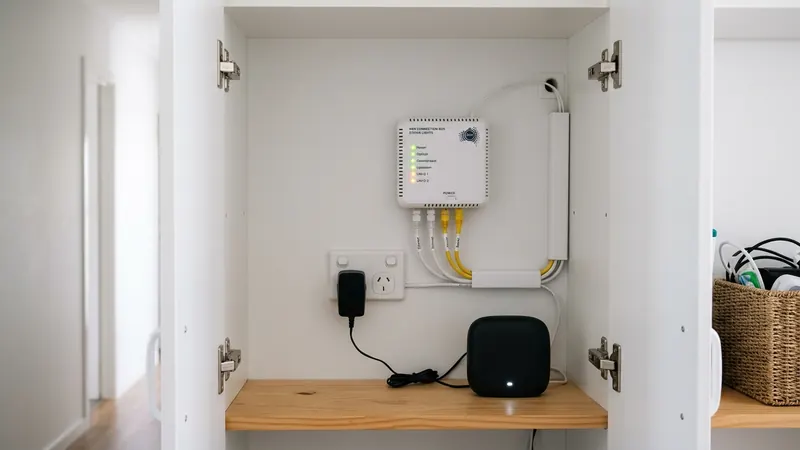
NBN Co deploys four distinct wired technologies across metropolitan and regional Australia. Find your wall box below before phoning support:
| Technology | Indoor Hardware | Healthy Steady State | Street / NBN Fault Signal | Indoor / ISP Signal |
|---|---|---|---|---|
| FTTP | White wall NBN Connection Box (NTD) | Power green, Optical green, UNI-D1 green/flashing | Red solid or flashing Optical LED (broken drop or street fibre) | Green Optical + dark/orange UNI-D (bad cable or wrong port) |
| FTTC | Small white NBN NCD box plugged into phone wall jack | Power blue, Connection blue solid, LAN solid/flashing | Audible clicking noise + blinking blue Link LED (pit DPU fault or wet copper) | Solid blue Link LED + dark LAN (router WAN fault) |
| FTTN / FTTB | Integrated VDSL2 modem/router only (no white NBN box) | DSL/Sync solid green, Internet solid | Endless blinking DSL / Sync light (dead street cabinet or corroded copper pit) | Solid DSL light + red Internet globe (ISP PPPoE login/backhaul issue) |
| HFC | Black Arris CM8200 cable modem + wall TV splitter | Power, Downstream, Upstream & Online solid blue/green | Flashing Downstream / Upstream arrows (coax node drop or street amp blackout) | Solid Online LED + dead Wi-Fi (router or Cat6 WAN cable problem) |
Why FTTC Boxes Click Loudly After Heavy Rain
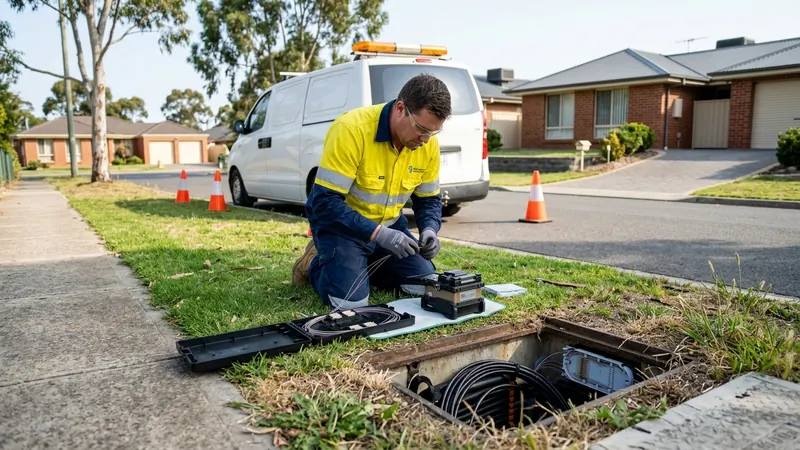
With Fibre to the Curb, optical glass ends inside a small Distribution Point Unit (DPU) submerged beneath the footpath concrete lid. Your white indoor NCD box sends reverse 50V DC power down your old copper phone lead-in to wake that street pit box up. Whenever summer storms flood concrete pits or moisture shorts underground twisted copper pairs, the box cycles its internal relay over and over—making an unmistakable metallic clicking tick every few seconds. Checking whether the street pit lid outside shows standing water gives your ISP's NBN fault team clear evidence for an infrastructure ticket.
3-Minute Isolation Check Support Agents Ask For
Complete these three steps before calling your ISP so your case skips level-one troubleshooting scripts straight into an NBN ticket:
- Proper Two-Stage Power Cycle: Unplug both the white/black NBN box and your router at the wall for a full 60 seconds. Plug the NBN box in first and wait two full minutes for optical/RF sync, then power your Wi-Fi router back on.
- Direct Cat6 Ethernet Bypass: Plug a laptop directly into
UNI-D 1(FTTP) or the HFC/NCD LAN port with Wi-Fi off. Note: some ISPs using PPPoE require router authentication, whereas IPoE providers assign a laptop an instant IP—at minimum, watch whether the UNI-D LED flips from dark to active green. - Check NBN Official Status & Local Postcode: Enter your street at NBN Co Network Status or check sibling suburbs on our postcode infrastructure lookup to see if planned NBN upgrades are scheduled today.
Why NBN Cuts Out Instantly During Blackouts
Older PSTN copper telephones ran off 48V exchange batteries, working even when whole suburbs went black. By contrast, FTTP, FTTC and HFC NBN hardware inside your hallway depends completely on 240V mains power. Even if NBN's exchange fan-out sites hold hours of generator backup, your indoor Connection Box and Wi-Fi router drop dead the second a street fuse blows unless connected to a desktop Uninterruptible Power Supply (UPS). An affordable 600VA UPS (under A$120) typically keeps a single FTTP box and low-draw router running for three to five hours—enough to keep Wi-Fi Calling active through an evening power cut.
Claiming Pro-Rata Fee Credits & TIO Complaints
Telcos rarely volunteer automatic rebates for dropped NBN days—you have to put a dated fault on record. Under ACMA rules and Australian Consumer Law, services not supplied with reasonable care and continuity entitle subscribers to fair remedies:
- Phone or web-chat your retail provider on day one and note the exact fault reference number.
- Once restored, ask formally for a pro-rata credit for every offline day plus reimbursement where emergency mobile data top-ups were reasonably required for remote work.
- If recurring weather dropouts remain unfixed after two NBN technician visits, or billing relief is denied, escalate free of charge to the Telecommunications Industry Ombudsman (TIO) on 1800 062 058. Generate your chronological claim timeline immediately in our Dispute Letter Generator.
Frequently Asked Questions
Can I call NBN Co directly to fix a broken street cable?
Ordinarily no—wholesale NBN Co only dispatches field technicians in response to fault tickets raised by your retail ISP (except emergency safety hazards like fallen overhead NBN cables, which can be reported via NBN's damage line).
What if my FTTP Optical light is green, but my router has no internet?
Check that your router's WAN Ethernet cable sits inside the active UNI-D port specified in your ISP welcome email (usually UNI-D1, or UNI-D2 if you recently churned providers) before logging an ISP authentication ticket.
How much refund am I entitled to after an NBN outage?
At minimum, providers generally owe a pro-rata daily credit of your monthly broadband fee for multi-day total outages—plus potential compensation for documented out-of-pocket hotspot expenses where service guarantees fail.