Stuck on SOS Only? 6 Steps When Telstra, Optus or Vodafone Mobile Towers Drop Out
Why Australian handsets drop to SOS Only during Telstra, Optus or Vodafone faults, how 000/111 roams onto rival towers, enabling Wi-Fi Calling, and MVNO host-network checks.
Watching five full 5G bars suddenly vanish into “SOS Only” triggers immediate unease—especially if family members are driving regional highways or an afternoon storm already knocked out home mains power. Whether a regional backhaul excavator severs Telstra optical fibre, a core routing fault hits Optus, or local power outages drain Vodafone or Spark cabinet batteries, knowing why a phone stuck on SOS Only behaves the way it does unlocks practical voice/SMS workarounds in under two minutes and clarifies critical Triple Zero rules.
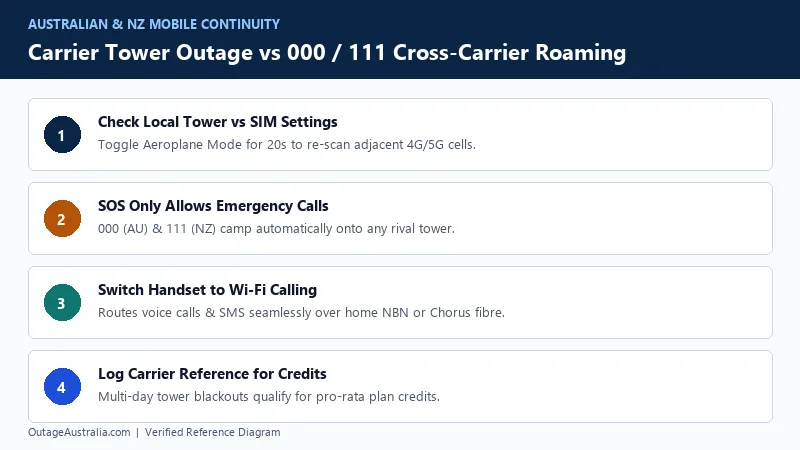
SOS Only vs "No Service" vs "3G Shutdown" Handset Drops
Notice the subtle wording on your lock screen—two nearly identical messages carry completely different meanings:
- “SOS Only” / “Emergency Calls Only”: Your SIM's home mobile network (Telstra, Optus or Vodafone) is down or unreachable, but your phone still hears radio beacons from at least one rival carrier tower nearby. Ordinary calls and banking SMS fail, yet 000 connects normally under ACMA emergency rules.
- “No Service”: Zero usable cellular radio towers from any Australian carrier reach your location—for instance, all regional towers share a single damaged backhaul trench or exhausted local blackout batteries.
- Single-Phone Drop After 3G Closure: Following Australia's permanent 3G network shutdown, imported overseas phones lacking full Australian 4G Band 28 (700 MHz) VoLTE emergency calling capability may be actively blocked from domestic towers even while family phones work beside them.
Step 1: Enable Wi-Fi Calling Before Your Carrier Drops
When fixed broadband (NBN, Opticomm or Chorus fibre) remains healthy while your carrier drops out, Wi-Fi Calling (VoWiFi) turns home Wi-Fi into an encrypted private cell tower—carrying normal voice calls, standard SMS and bank one-time verification codes even with zero cellular signal.
Enable it ahead of emergencies (since first-time SIM activation normally needs a brief cellular carrier handshake): on iOS, navigate to Settings → Mobile Service → Wi-Fi Calling; on Android/Samsung, open Settings → Connections → Wi-Fi Calling and verify your Australian residential street address for Triple Zero geolocation.
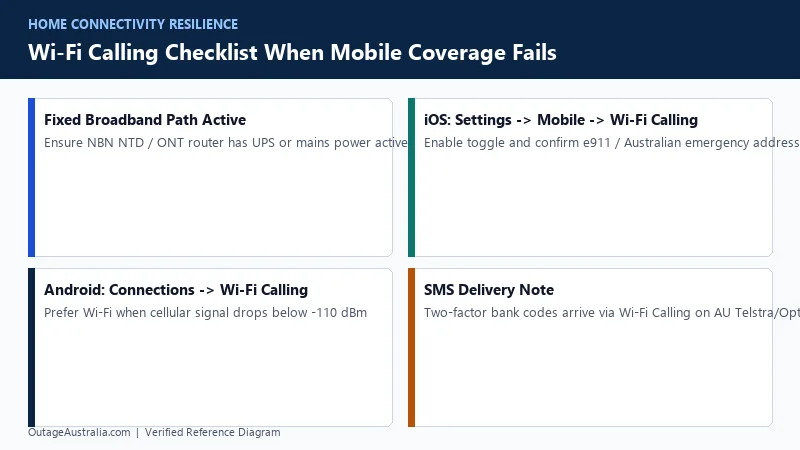
Step 2: Run the 20-Second Aeroplane Mode Scan
Smartphones hold stubbornly onto the last tower sector they authenticated on until signal collapses totally. When riggers switch off a nearby antenna sector for maintenance or a single sector trips during storm wind, toggling Aeroplane Mode ON for 20 seconds and then OFF clears cached paging tables and forces your modem to hunt an adjacent healthy tower several kilometres across town.
Step 3: Check MVNO Host Networks (Boost, Belong, Amaysim, Felix)
Millions of Australians save money on Mobile Virtual Network Operators (MVNOs) without always recalling which physical towers carry their signal. Whenever your MVNO goes blank, check its host carrier's live status page:
| Mobile Brand / MVNO | Underlying Physical Network | Live Status Tracker |
|---|---|---|
| Boost Mobile, Belong, ALDI Mobile | Telstra Mobile Network (Wholesale / Full) | Telstra Mobile Outages |
| Amaysim, Dodo, Coles, Circles | Optus Mobile Network | Optus Mobile Outages |
| Vodafone, TPG Mobile, Felix, Kogan | Vodafone / TPG Telecom Network | Vodafone Australia Outages |
Step 4: Plan Around 4–12 Hour Tower Battery Exhaustion During Power Cuts
When a major bushfire or storm blackout disconnects AC street power across a regional shire, local mobile base stations keep broadcasting temporarily on cabinet backup batteries. Most urban sites hold four to eight hours of autonomy; critical rural highway hubs carry 12-hour reserves or portable diesel generator plugs. If mobile bars disappear smoothly six hours into a suburb power outage, tower connectivity generally returns only once power crews restore street AC lines.
Step 5: Keep a Dormant Alternate-Carrier eSIM & Avoid Illegal Repeaters
Tradies, delivery drivers and regional families whose livelihood hinges on continuous voice/EFTPOS connectivity can add a cheap secondary pay-as-you-go eSIM sitting on an opposing physical carrier (for instance, keeping an Optus or Vodafone standby eSIM alongside a primary Telstra plan). Switching cellular data in iOS/Android Settings takes ten seconds during any single-carrier core failure. By contrast, never plug uncertified cheap online cellular repeaters into wall sockets: under ACMA spectrum rules, unauthorised repeaters jam public towers and attract heavy fines—stick strictly to carrier-certified Cel-Fi equipment.
Step 6: Claim Pro-Rata Credits & Escalate Prolonged Outages
Multi-day mobile outages entitle post-paid and prepaid subscribers to pro-rata plan fee credits, bonus data or reimbursement of reasonable alternate connectivity costs under TIO guidelines. Log your carrier ticket number early—before call centres clear congestion logs—save receipts for emergency prepaid eSIM top-ups, and record whether failed signal blocked medical alarms or small-business EFTPOS sales.
Note that across regional Australia and New Zealand, temporary mobile emergency trailers (COWs — Cells on Wheels) are routinely deployed during multi-day natural disasters to restore 000 and voice corridors around town centres, alongside temporary roaming waivers between rival carriers following severe emergencies. Prepare a clean chronological claim in our Dispute Letter Generator if fair relief is refused.
Frequently Asked Questions
Can I receive bank SMS 2FA codes while my phone says SOS Only?
Yes, provided Wi-Fi Calling was already activated on your SIM and your handset is connected to healthy home Wi-Fi—both calls and standard SMS tunnel cleanly over Wi-Fi Calling across major Australian carriers. Where critical bank accounts rely on authenticator apps, configure app-based TOTP tokens as backup before travelling.
Do newer iPhone and Android Satellite SOS alerts work in Australia?
Yes—supported modern handsets include direct Satellite Emergency SOS text routing when zero terrestrial mobile towers ("No Service") reach remote highways across Australia and New Zealand.
Why did my Amaysim phone lose signal at the exact same minute as my neighbour's Optus phone?
Amaysim operates directly on Optus physical radio towers and backhaul; any Optus tower or core outage hits Optus and its MVNO brands identically.